Roastpic
Increased B2B task completion by 30% with a database and error flow redesign
Overview
Specialty coffee is an industry where even small differences matter. A slight change in roast color or an unnoticed defect can alter flavor and, for small roasters, make or break long-term wholesale relationships. Large roasters rely on expensive tools like Agtron meters and lab analysis, but these cost thousands of dollars. Smaller shops often can’t afford them and fall back on handwritten notes and manual comparisons.
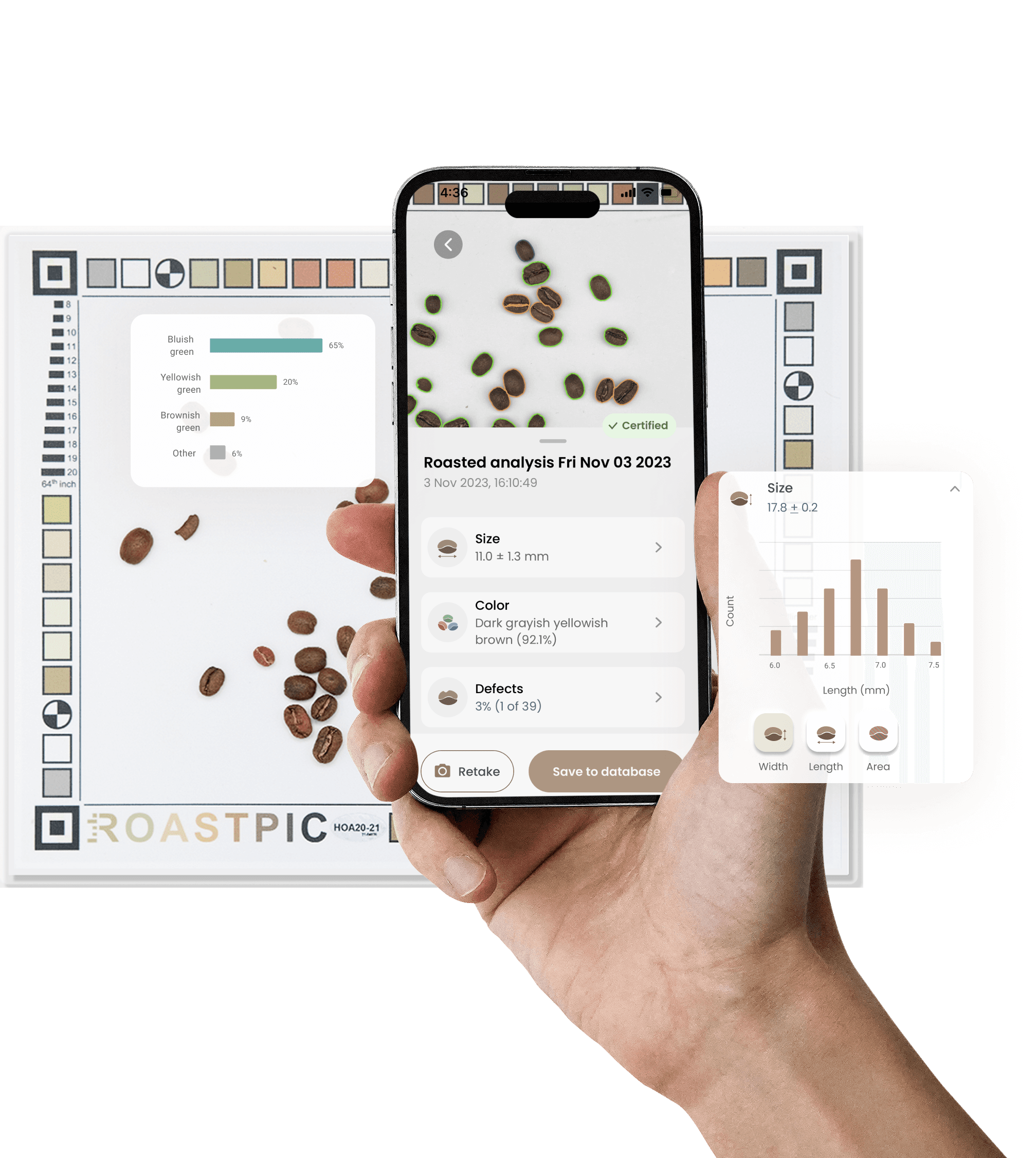
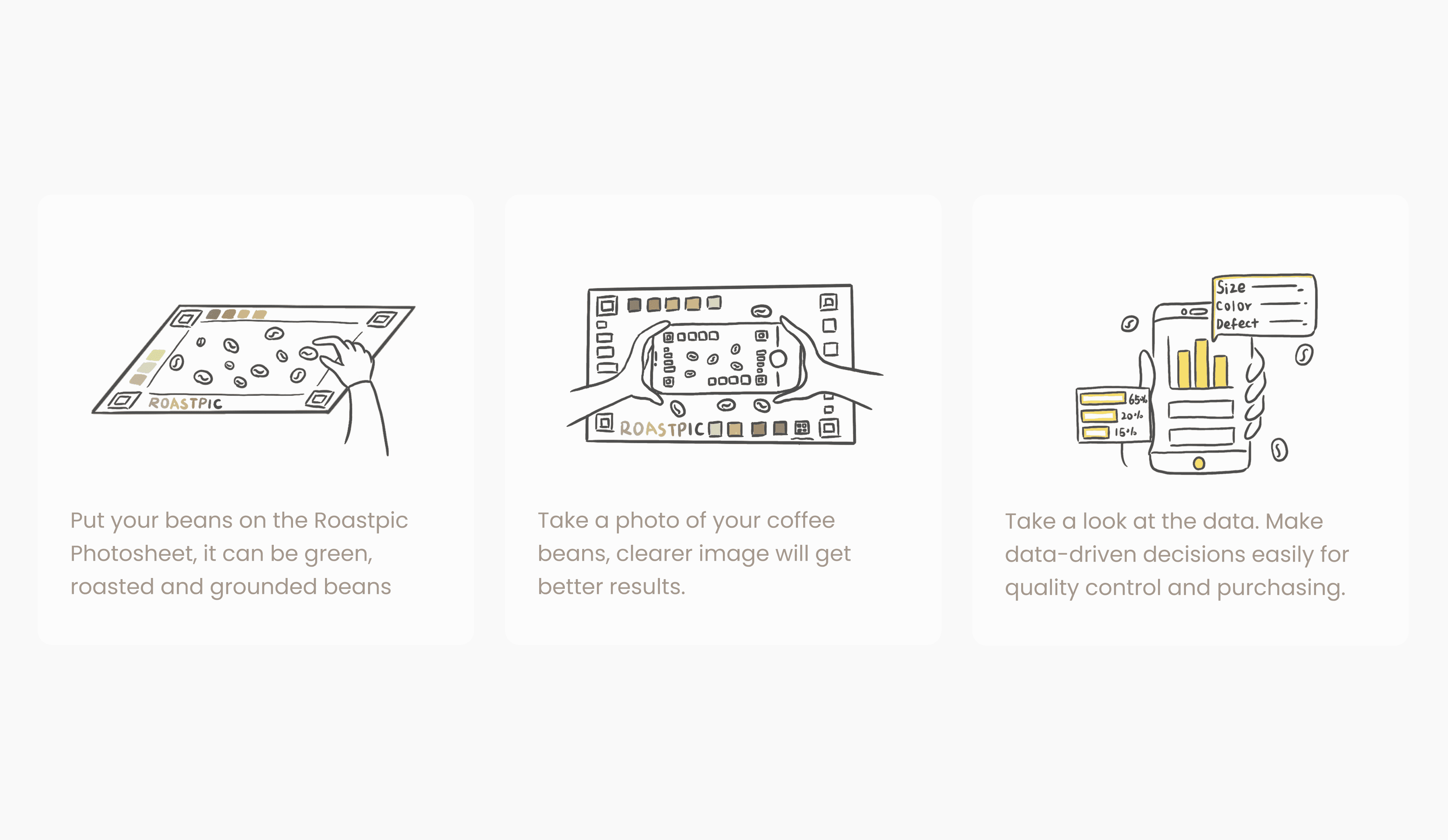
Roastpic set out to bridge this gap. Using just a smartphone camera and computer vision, the app lets roasters quickly test beans for color, size, and defects. As the sole designer from concept to beta, I led the full design process: shaping product vision, conducting field research, prototyping, and redesigning key flows that directly improved adoption and business value.
Discipline
Product Design, UX Design
Platform
IOS
Team
1 Product Designer
2 Developer
4 Research Engineer
Time Frame
3 months within a 2-year product journey
Challenge
After our beta launch, Roastpic quickly gained traction among small-batch roasters across North America and Europe. Roasters loved the idea of analyzing roast color and defects through photos instead of expensive lab equipment; and within weeks, hundreds joined our TestFlight beta.
However, as more users onboarded, we saw a sharp rise in incomplete comparisons and repeat photo uploads. In follow-up interviews, 60% of users said the process felt “slow” or “confusing.” They valued accuracy, but the interface made it hard to compare roasts or trust their results. If roasters couldn’t easily analyze their data, they’d revert to manual tools and our product would lose credibility as a time-saving solution.
Our challenge was to simplify the comparison experience and rebuild confidence in the app’s reliability without sacrificing technical accuracy.
Research
To understand why users struggled with batch comparisons, I combined field observations and usability testing to study how roasters actually worked both in their physical environment and within the app.
Field Observations
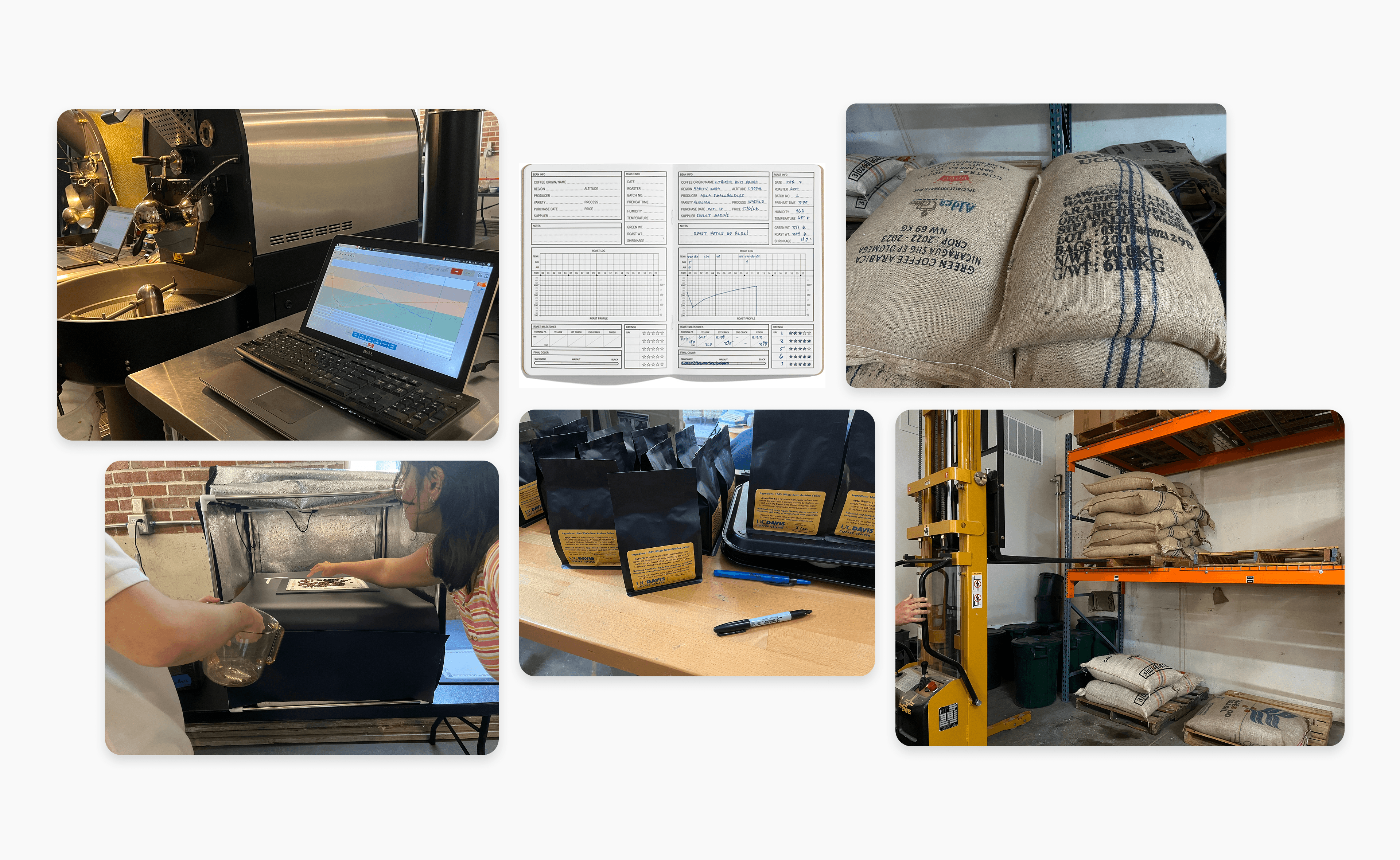
I visited three small coffee roasters and spent time observing their end-to-end process, from roasting beans to packaging them for customers. I noticed that roasters tracked their work very systematically, writing notes in logbooks that captured lot numbers, roast dates, origins, and defects. More importantly, they often selected a representative batch within a lot and used it as a baseline to compare other batches.
Usability Test
In structured testing sessions, I asked roasters to complete three key actions: save a batch photo, locate a previous batch, and compare the two.
Finding
Slow batch retrieval
Roasters took nearly forty seconds to locate the right batch, which was too long in their fast-paced environment.
Unclear system feedback
In three out of five attempts, poor lighting or background noise in the photo caused the app to fail, but the error was never communicated. Roasters often assumed the app was broken.
Low interpretability
The data output was technically accurate but not easy to interpret. Roasters had difficulty understanding what the app’s results meant for their next roasting decision.
These findings clarified the core design priorities: reduce friction in comparison workflows, make system feedback visible and reliable, and translate technical results into actionable insights.
Challenge 1: Database & Comparison Flow Redesign
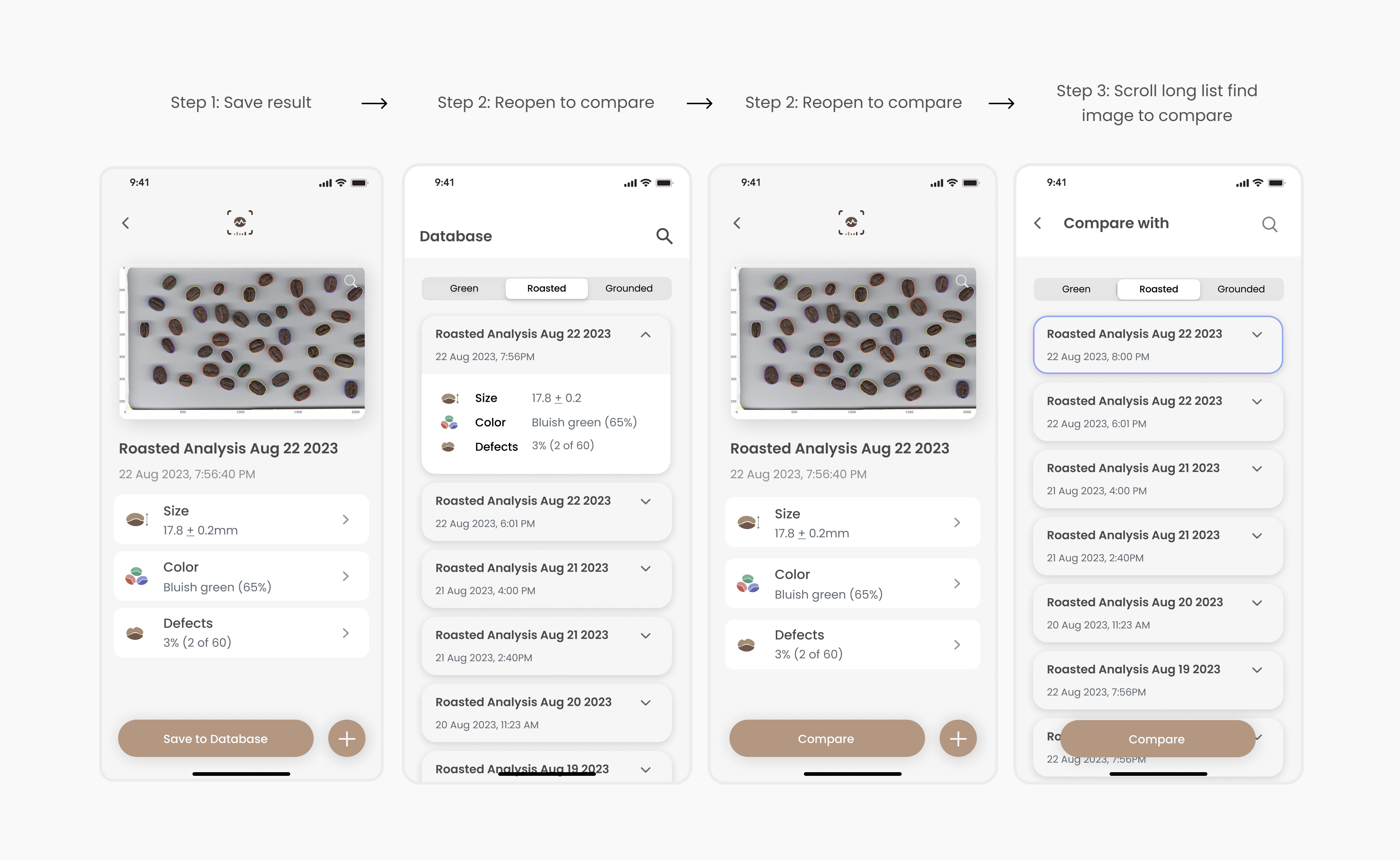
In the original flow, comparing batches was a multi-step process that felt unintuitive. After roasters took a photo, the app automatically saved it to the database with a default timestamp as its only identifier. If they wanted to compare this batch with another, they had to:
Save the result (with a generic date as the name).
Reopen the result screen, find the “Compare” button, and tap it.
Get redirected back to the database view.
Scroll through a long list of other timestamped images to locate the correct batch.
Something as simple as comparing today’s roast with last week’s took over forty seconds, multiple screens, and often left roasters frustrated.
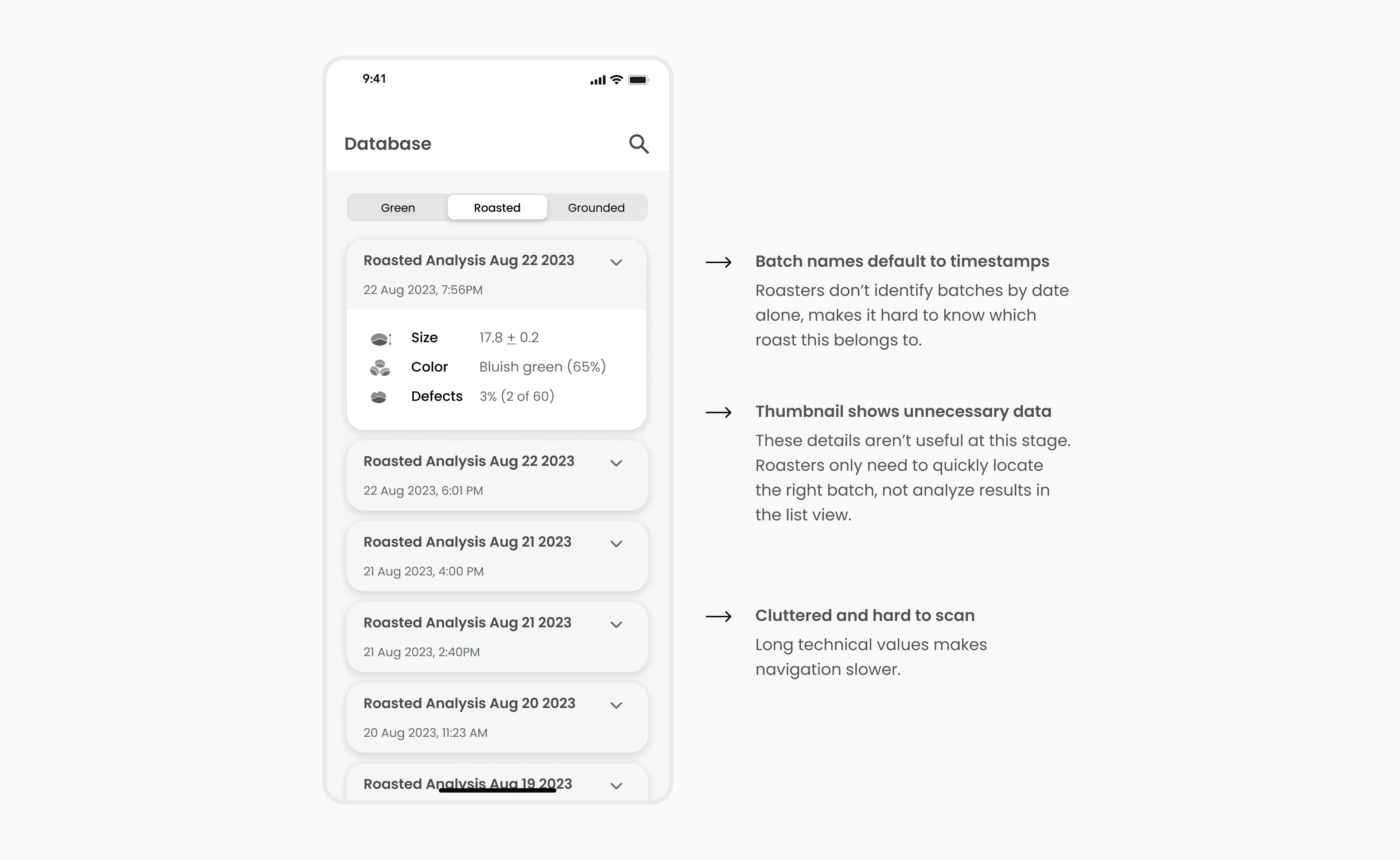
Diving deeper, the issue wasn't just too many clicks. The database itself wasn’t designed for how roasters think. Each photo was saved only with a timestamp, and the database list showed technical values like bean size and color percentages. This made it difficult for roasters to identify the batch they wanted whether they were comparing or simply browsing.
Design Strategy
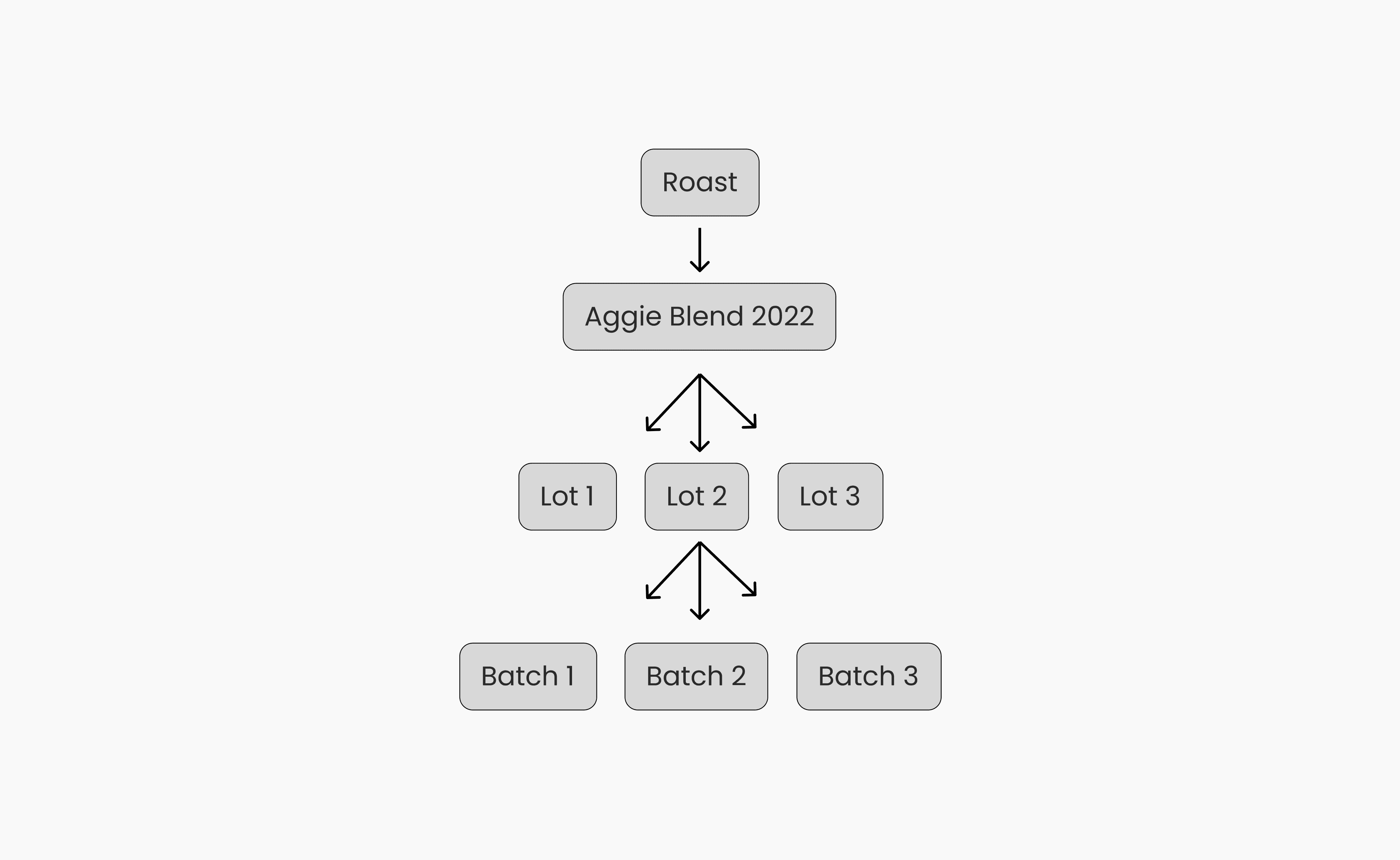
To fix this, I realized we couldn’t just simplify screens, we had to redesign the saving system and database schema so that it mirrored roasters’ real workflow (Roast → Lot → Batch).
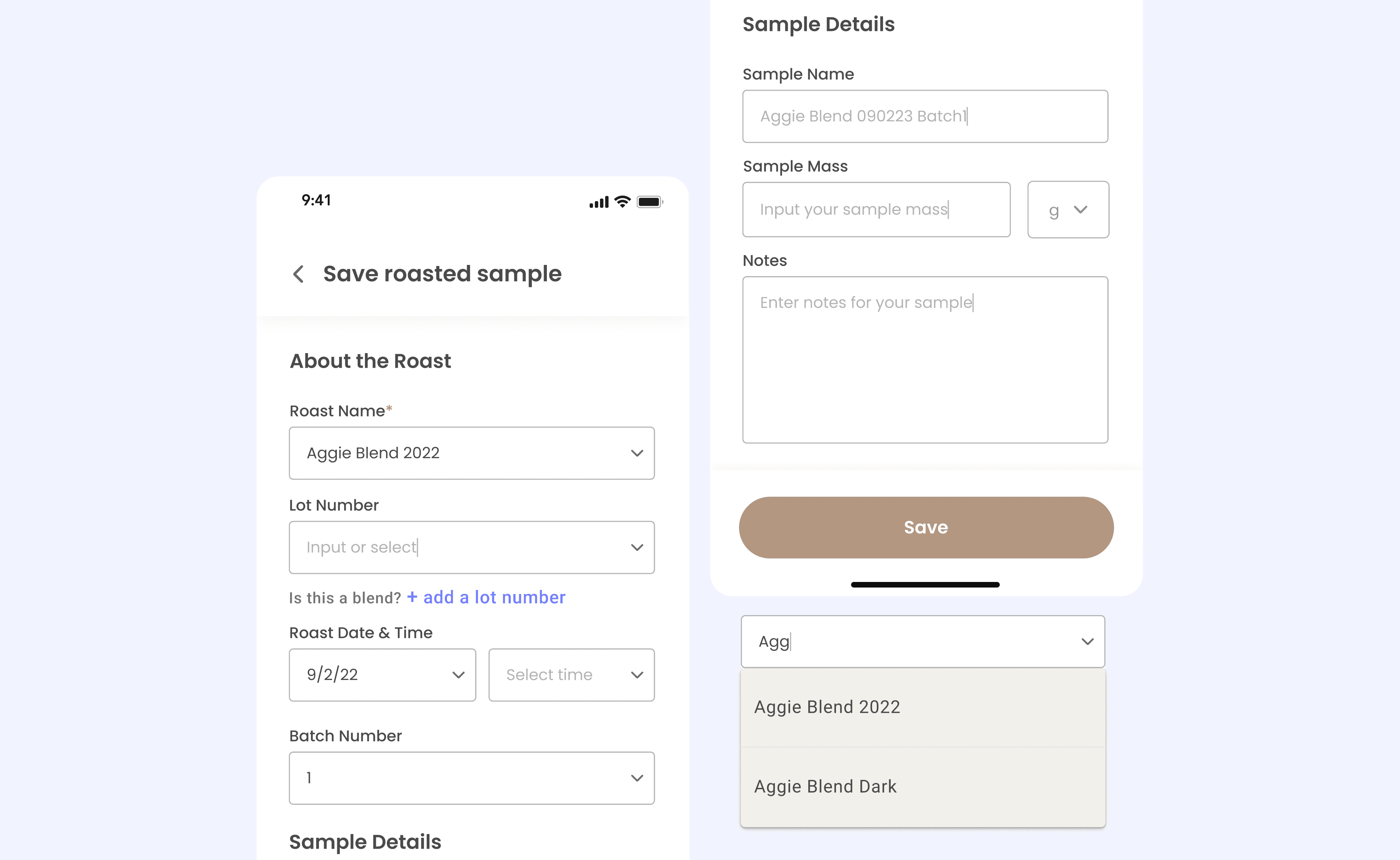
To support this, I worked with engineers to redesign the backend database schema. Each saved image would carry structured metadata: roast name, lot number, roast date, batch number, and optional notes. This meant the system could generate a much richer, filterable history of batches over time.
To make this database usable, I designed a Save Roasted Sample flow. After taking a photo, users are presented with a form where they can enter details about the batch. To reduce friction, the system is designed with an auto-suggest mechanism:
When a user begins typing (e.g., “Aggie”), the system surfaces previous entries such as Aggie Blend 2022 or Aggie Blend Dark in a dropdown.
Once a roast is selected, the system automatically increments the batch number under that roast (Batch 1, 2, 3…) so users don’t need to track it manually.
Over time, the system learns from previous inputs, which makes saving faster and more consistent.
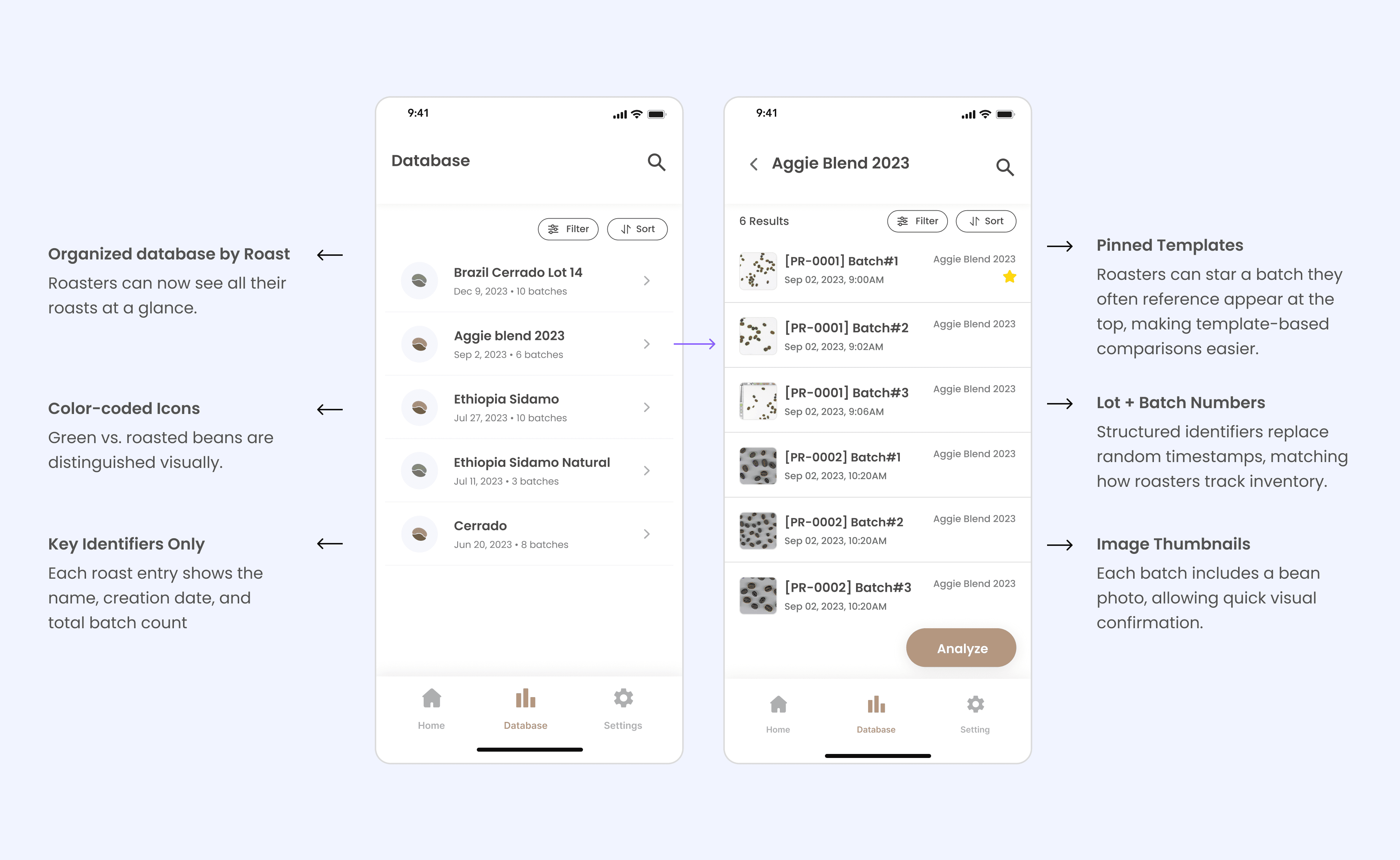
After redesigning the saving form, the next challenge was deciding how saved batches should appear in the database view. Based on what we found, roasters are looking for identifiers like roast name, lot number, and roast date to locate the right batch.
To address this, I redesigned the database homepage to display only the essential identifiers — roast name, creation date, and total batch count. This gave roasters an immediate overview of their inventory. I then moved detailed analysis deeper into the flow, so users can first orient themselves by roast and batch before diving into bean-level metrics. This shift reduced clutter, improved scannability, and aligned the system with the way roasters naturally organize their work.
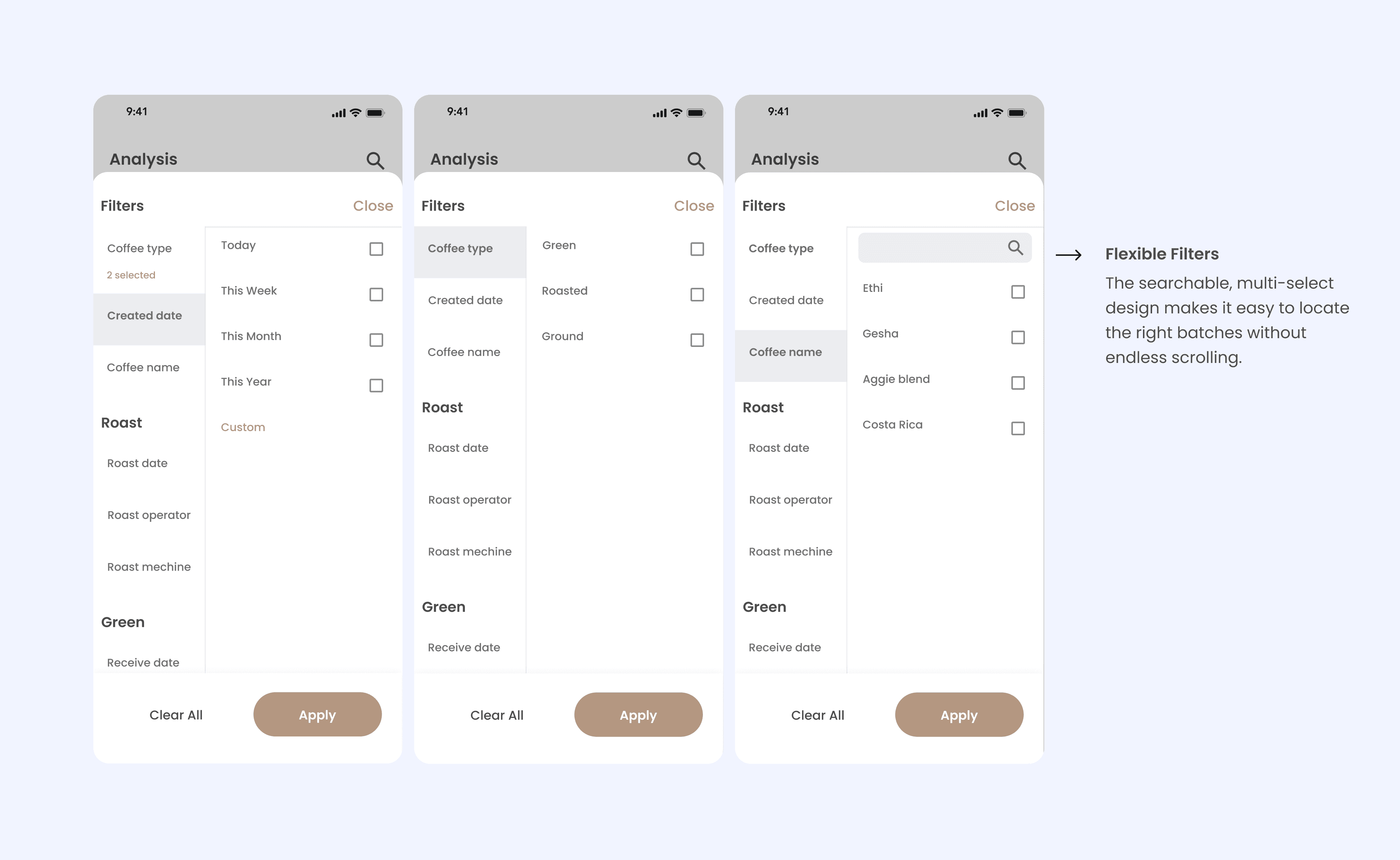
While the redesigned database view improved scannability, roasters still needed a way to narrow down results when managing hundreds of batches.
To address this, I designed a filter system that lets roasters quickly slice their database by the most relevant criteria. The filter menu is structured around how roasters actually think: starting with coffee type, then narrowing by dates, roast operators, machines, or specific coffee names.
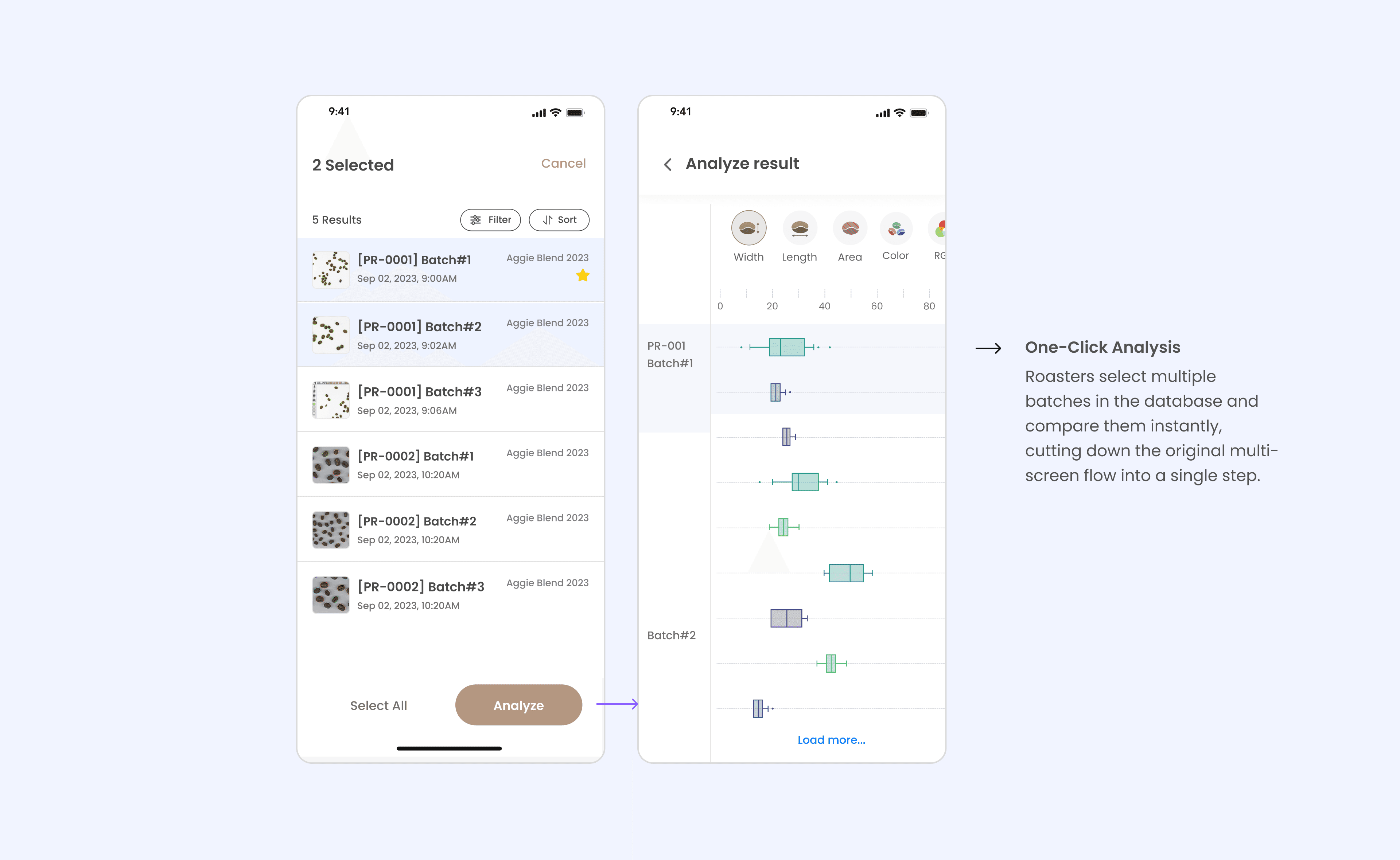
Finally, to address the very first pain point—too many screens to compare batches—I added an Analyze button directly in the database view. Instead of opening one result, saving, and reopening multiple times, roasters can now select several batches at once and jump straight into side-by-side analysis.
Outcome
The redesign reduced the average comparison time from 1 minute 30 seconds to around 20 seconds. Beyond saving time, the new database structure created clearer traceability between roasts, lots, and batches, which helped roasters maintain consistency across production, while giving us cleaner data management to support future analytics and business growth.
Challenge 2: Photo Capture & Error Transparency
Issue
During beta testing, roasters frequently ran into photo errors without understanding why. The algorithm often misclassified beans — for example, mistaking roasted beans for green ones — or rejected photos due to poor lighting or setup. The app simply displayed an error with no explanation, leaving users confused and frustrated. Many assumed the system itself was unreliable.
Diagnosis
The issue was with how the app communicated results:
The algorithm tried to automatically guess the bean type, but often failed.
Only “perfect” photos were accepted. All others were rejected with no feedback.
Users had no way to know whether the problem was their environment, their input, or the app itself.
Design Strategy
To address this, I explored ways to:
Guide users before capture so the algorithm didn’t have to guess.
Provide graded results instead of binary pass/fail.
Educate users through feedback loops to improve their photo-taking environment.
Initially, I wanted to design a custom in-app camera with real-time guidance (alignment markers, light indicators, bean recognition). However, due to limited engineering resources, we could only use the default iOS camera, which meant I had to design support screens before and after capture to guide users.
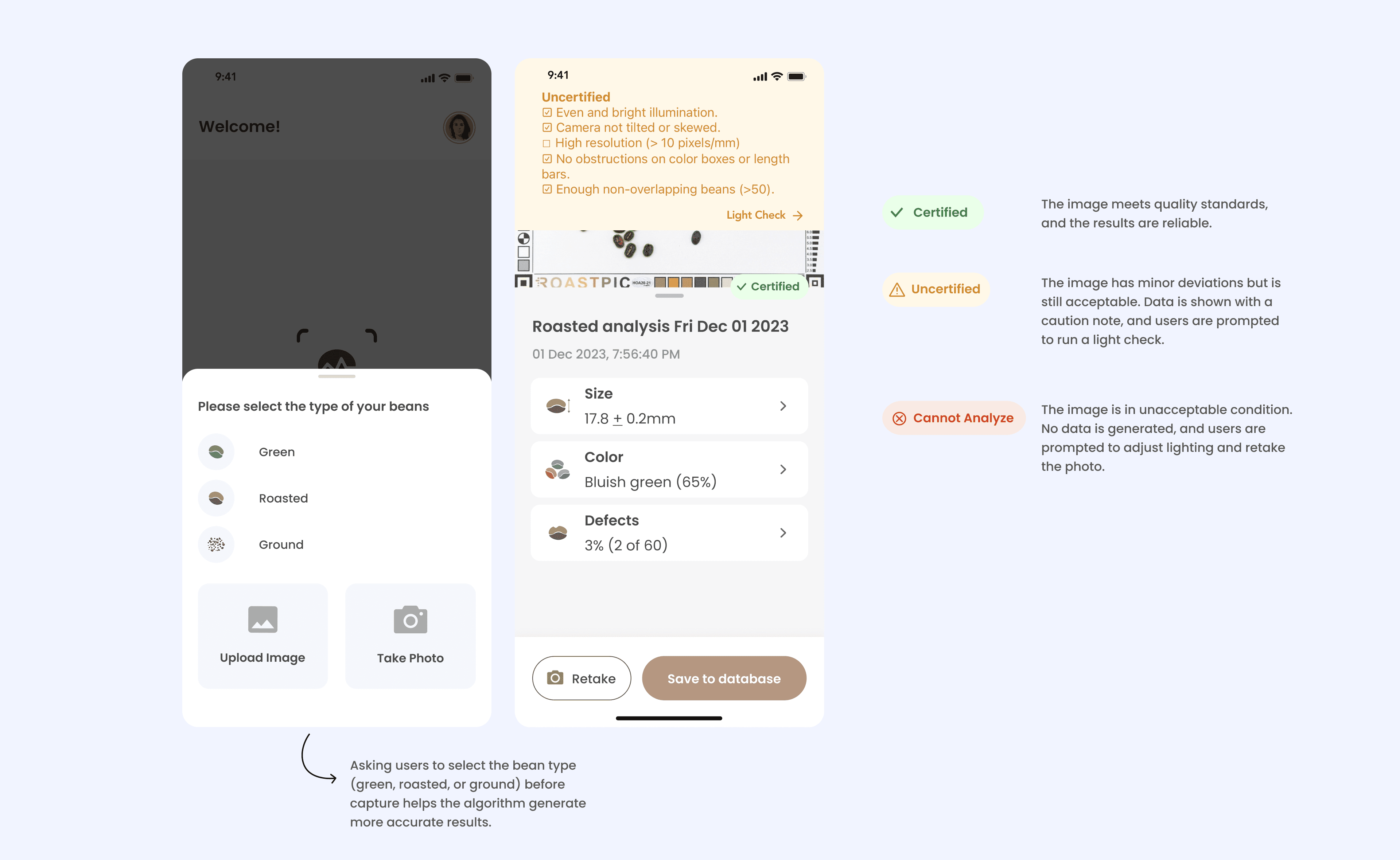
Working with engineers, I designed a three-stage checking system to replace the opaque error messages. Instead of rejecting photos outright, every capture is now classified as Certified, Uncertified, or Cannot Analyze. This approach turned errors into actionable feedback. Users can now see all their photos, understand why some results may be less precise, and take steps to improve their setup.
Additionally, I introduced pre-capture guidance by asking users to select the bean type before taking a photo. This reduced algorithm misclassification and gave users a sense of control.
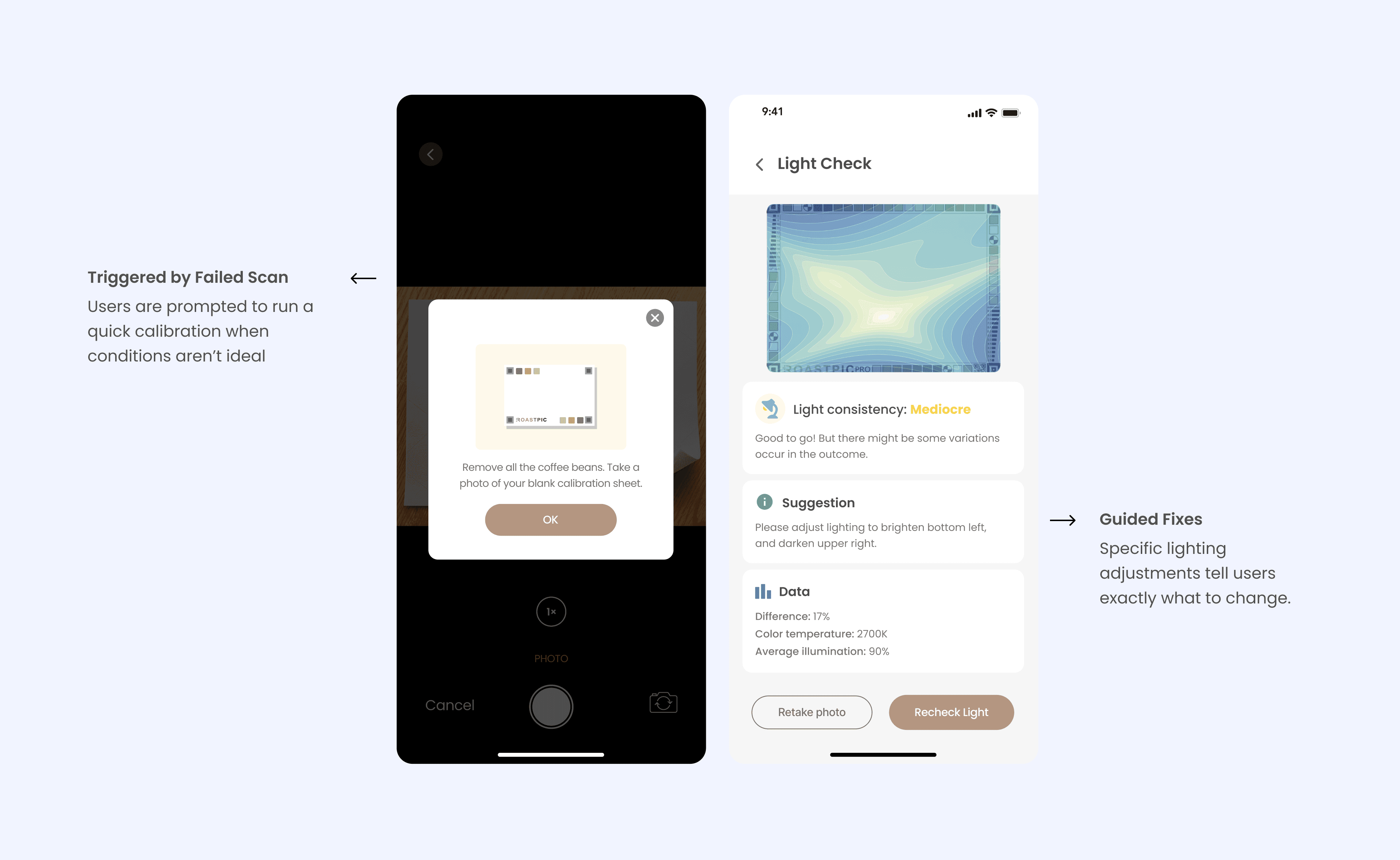
To support the new graded certification system, I also designed a Light Check flow. Instead of rejecting photos outright, the app now prompts users to run a quick calibration when conditions aren’t ideal. Users take a photo of the blank sheet, and the system highlights lighting consistency, offers targeted suggestions, and provides data transparency.
Outcome
The new certification system and Light Check flow turned photo capture from a frequent failure point into a guided, transparent process. After launch, error-related support tickets dropped by 40%. Roasters reported higher satisfaction and confidence in their results, which increased product adoption and positioned our tool as a more reliable solution for quality control.
Conclusion & Learnings
Roastpic was my first real industry project since stepping into UX in 2022, and it marked a big transition for me as a designer. Working in a fast-paced startup with limited resources pushed me to see constraints not as blockers, but as opportunities to learn.
Looking back, I can see moments where my design decisions were immature or lacked depth, but those challenges were exactly what shaped my growth. Over two years on this project, I learned how to balance business goals with user needs, and how to design not just for usability, but also for product value and long-term scalability.
This project gave me the foundation to move forward as a designer who can think critically, adapt quickly, and align design decisions with real business outcomes. I deeply appreciate the chance to work on Roastpic, the guidance from my teammates and mentors, and the trust from the roasters who tested our product. Their feedback and support shaped not only this app, but also my journey as a designer.
More Case Studies